| INI File Configuration |
| |
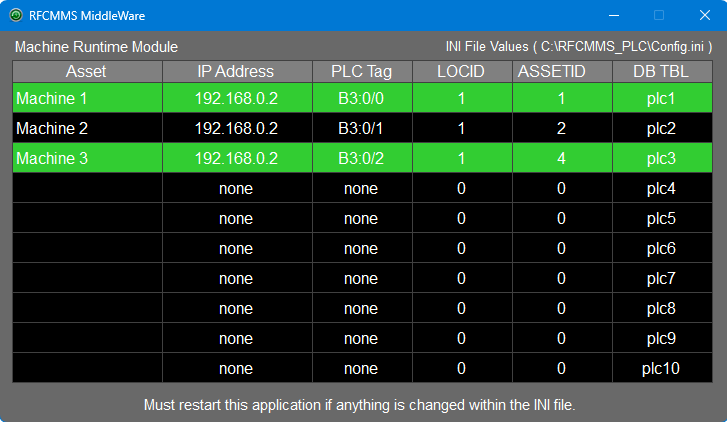
| This application uses a configuration file called "Config.ini" to establish the parameters of the application. If you ever mess up or delete this file, you can obtain the file here for free. |
| View the entire INI file here |
| |
| * See "Adding A PLC" page at the bottom for setting up your PLC IP Address. |
| |
 |
| |
| |
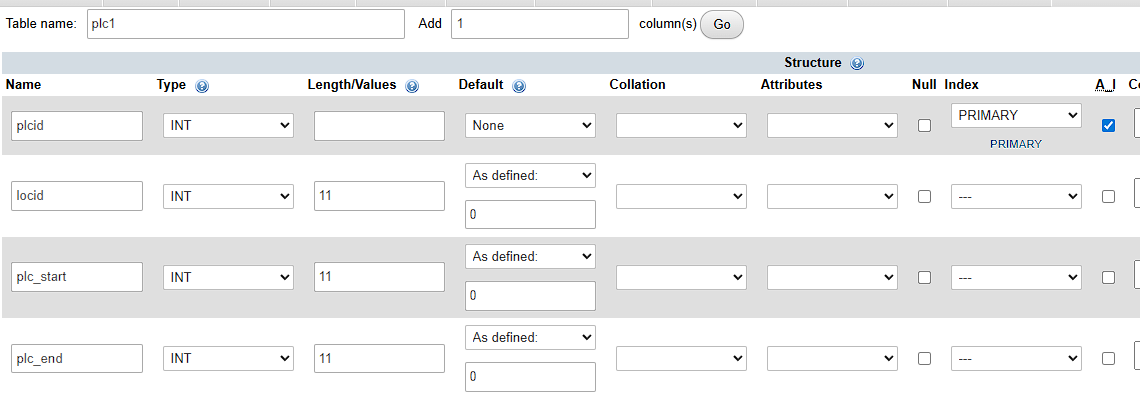
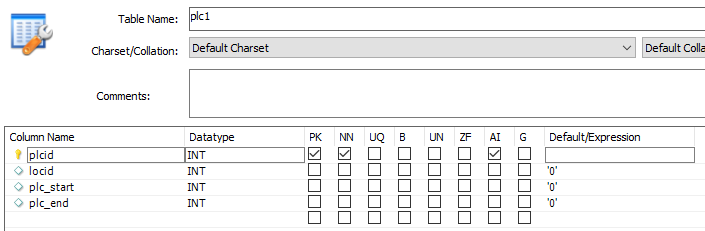
| Attention: First thing you need to do is add the necessay tables to your database. |
| |
| All the tables contain the same setup, only the table name must be different and must increment by 1 as you add them. See image above. |
| |
| phpMyAdmin (click image to enlarge) |
 |
| |
| If you are adding this feature to the RFCMMS web application, add the following fields to the "assets" table. |
plc_tablename VARCHAR(10) Default ''
runtime_hours FLOAT Default 0 |
| |
| MySQL Workbench |
 |
| |
| |
| The INI file has 2 section. One is for the database connection and the other is for PLC connectivity. |
| |
| Section 1: Database Connection |
| |
[DATABASE_CONNECTION]
SERVER_NAME=localhost
SERVER_USER=database_username
SERVER_PASS=database_password
SERVER_DBNAME=database_name |
| |
| The above is preset for a workstation or windows server that is local to the MySQL server. Change the information after the equal sign ( = ) to match your database connection requirements. |
| |
| If you are using a database that is located on a hosting platform, setup a "Remote Connection" in your account and replace "localhost" with the provided "IP address". |
| |
| Section 2: PLC Connectivity |
| |
[PLC_CONNECTION]
PLC1_IP_ADDRESS=192.168.0.2
PLC1_TAG=B3:0/0
PLC1_ASSET_DESC=My Machine
PLC1_LOCID=0
PLC1_ASSETID=0
PLC2_IP_ADDRESS=none
PLC2_TAG=none
PLC2_ASSET_DESC=
PLC2_LOCID=0
PLC2_ASSETID=0 |
| |
| PLC1_IP_ADDRESS |
This is the IP address set on the PLC. PLCs must have an IP address set that is on the network to make a connection. This is how the application knows where to look. |
| PLC1_TAG |
This is the OUTPUT tag set in the PLC program. Do not use an input tag. An input will give you a double bump and cause a double database entry. |
| PLC1_ASSET_DESC |
This is used for the application so you can see what the connection is for. |
| PLC1_LOCID |
Used with the "RFCMMS web application". Use a "0" when not using the web application. |
| PLC1_ASSETID |
Used with the "RFCMMS web application". Use a "0" when not using the web application. |
|
| |
For any connectivity that will not be used, enter the word "none" after the equal sign for "PLC#_IP_ADDRESS" and "PLC#_TAG". Place a "0" for the "PLC#_LOCID".
See the INI file example in the link above. |
| |
